
Teleprompter.com: the teleprompter app, and what it leaves you to edit
For anyone using a teleprompter app for talking-head videos: what Teleprompter.com does, what each plan includes, and why ClipEasy, coming soon, also edits the take after you read it.
Get early access Coming soon to iOS and Android
Record it once. Post it in minutes.
Leave the stumbles in. ClipEasy cuts them out and adds captions, and you change anything in a few taps. Coming soon to iOS and Android.
Teleprompter.com
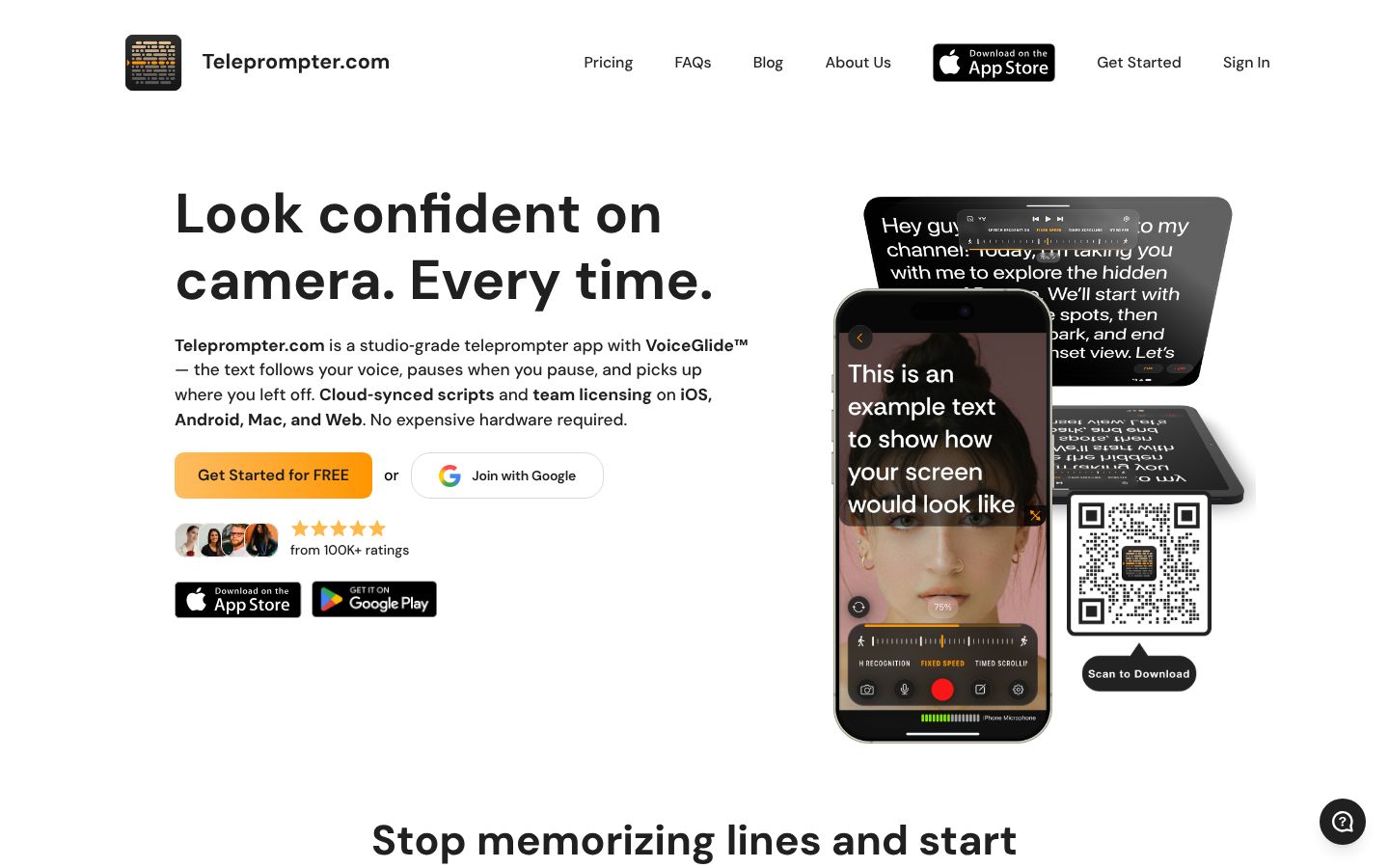
Teleprompter.com is a teleprompter app for people who read a script on camera. Its VoiceGlide mode scrolls the text as you speak, pauses when you pause and picks up where you left off. You can record in the app on iOS or Android in up to 4K, or mount the device on a teleprompter rig. Scripts sync through the cloud across iOS, Android, Mac and Web. It also offers subtitles generated from your script, Clean Audio to remove background noise, background replace and blur, trimming, resizing for social platforms, remote control from other devices and live streaming. It markets to content creators, public speakers, educators and businesses.
Best for: Creators, speakers and businesses who want to read a script smoothly while recording, on a phone, tablet, Mac or a teleprompter rig, and who will do any cutting of the take themselves or in another editor.
- VoiceGlide voice-activated scrolling: the text follows your voice, pauses when you pause and picks up where you left off
- Works on iOS, Android, Mac and Web with cloud-synced scripts
- Records in the app in up to 4K, with front and rear camera switching during a take
- Automatically generates subtitles from your script, with editable timing and appearance and export in multiple formats
- Clean Audio removes background noise, and external microphones are supported
- Remote control from another iPhone, iPad or Apple Watch, plus Bluetooth keyboards, presentation remotes, game controllers, MIDI controllers and foot pedals
Teleprompter.com plans: what each one includes, not just its price
| App | Plan | Price | Billing | Includes |
|---|---|---|---|---|
| Teleprompter.com | Starter | Free | Free | Record with watermark, cloud script storage, iOS, Android, macOS and Web access, custom fonts and colors, remote control. 1080p export; automatic subtitles and AI script generator 'Try Once'. |
| Teleprompter.com | Pro | $19.99/mo | Per seat monthly; $7.5/mo billed yearly | 4K, no watermark; 7-day free trial; 3 logged-in devices. Everything in Starter plus 4K recording (no watermark), horizontal and vertical mirroring, remote preview on another device |
| Teleprompter.com | Pro (App Store) | $89.99/yr | Yearly in-app purchase, 'Pro from $89.99/year' | About $7.50 a month; 7-day free trial; video allowance not stated. Pro subscription with a 7-day free trial, one subscription across all platforms, managed through the iTunes account. |
| Teleprompter.com | Max | $49.99/mo | Monthly; $24.99/mo billed yearly | 4K, no watermark; 100GB cloud storage; longer Clean Audio and subtitles; 7-day free trial. Everything in Pro plus 100GB cloud storage, longer Clean Audio, longer subtitle generation, priority support |
| Teleprompter.com | Team | $49.99/mo | Monthly; $24.99/mo per seat billed yearly | Multiple editors, shared workspace; 3 logged-in devices per user. Everything in Max plus multiple editors and shared workspace. 3 logged-in devices per user. |
Prices as of 2026-11-07, from each app's own pricing page.
ClipEasy and Teleprompter.com, feature by feature, for scripted talking-head videos
| Feature | ClipEasy | Teleprompter.com |
|---|---|---|
| Edit steps you still do yourself | None: all 6 done for you | Remove retakes and false starts, tighten the opening |
| Cuts dead air and pauses | Yes | — |
| Removes filler words | Yes | — |
| Overlap audio blended across cuts | Yes | — |
| Edits several different videos at once | Up to 10 | — |
| Take stops on its own after the last line | Yes, three seconds after your last line | — |
| Cut checked against your script | Yes, keeps the take where you got each line right | — |
| Batch edits run while you do something else | Yes | — |
| Works without editing experience | Yes, ClipEasy does the cutting | — |
| Removes retakes and false starts | Yes | You do it by hand |
| Auto captions | Yes | Yes, from your script (paid plans; free plan Try Once) |
| Audio cleanup | Yes | Yes, Clean Audio on paid plans |
| Tightens the opening | Yes | You trim it by hand |
| Edit it yourself after the AI edit | Yes | Limited: trim, resize, intros and outros |
| Teleprompter that follows your voice | Yes | Yes, VoiceGlide |
| Film in the app or upload a take | Yes | Yes |
| iPhone app | Coming soon | Yes |
| Android app | Coming soon | Yes |
| Teleprompter keeps up if you skip a line | Yes, it finds your line, or you tap the next card | Catches up after you stray, per a reviewer; skipping ahead not stated |
| Script waits when you pause | Yes, each word fades as you say it | Yes |
| Ready to post on TikTok, Reels and Shorts | Yes, save it to your phone and post anywhere | Yes |
- Removes retakes and false starts: Reviewers report takes are grouped into one long clip, which makes editing and reviewing takes harder.
- Audio cleanup: Clean Audio removes background noise; not included on the free Starter plan.
- Tightens the opening: A Trim Recording tool is listed; no automatic opening edit is mentioned.
- Edit it yourself after the AI edit: No AI edit of the take is described; manual tools include trim, resize and intros and outros.
- Film in the app or upload a take: Records in the app and lists 'Import videos to edit'.
- Script waits when you pause: VoiceGlide pauses when you pause.
- Ready to post on TikTok, Reels and Shorts: Formats videos for YouTube, Instagram, TikTok, LinkedIn and other platforms.
What Teleprompter.com does, and what ClipEasy adds after the take
Retakes and false starts: cut for you or by hand
ClipEasy removes restarts on its own and keeps the take where you got each line right. On Teleprompter.com you find and trim them yourself, and reviewers report takes are grouped into one long clip.
A teleprompter that follows your voice, in both apps
Both scroll as you speak and wait when you pause. ClipEasy's also finds your line if you skip, stops the take three seconds after your last line and uses the script to guide the cut.
The opening, tightened as part of the edit
ClipEasy tightens the start of every video for you. Teleprompter.com lists a Trim Recording tool, so the first seconds of each take are yours to trim by hand.
Pauses, filler, captions and audio in one pass
ClipEasy cuts pauses and filler, adds captions and cleans up the audio, blending it across each cut. Teleprompter.com builds subtitles from your script and offers Clean Audio on paid plans.
Up to 10 videos edited at once
Film one take per product and ClipEasy edits up to 10 different videos at once while you do something else. Then change anything in a few taps.
Platforms: today and coming soon
Teleprompter.com runs on iOS, Android, Mac and Web now. ClipEasy is coming soon to iOS and Android. Reviewers report VoiceGlide working only part of the time on Teleprompter.com's Android app.
Where Teleprompter.com is the right tool
It supports teleprompter rigs, remote controls and live streaming, which ClipEasy does not list. It is also available to download today.
Teleprompter.com: pros and cons
- Removes retakes and false starts and tightens the opening for you, keeping the take where you got each line right
- Cuts pauses and filler, adds captions and cleans up the audio, blending it across each cut, all in one edit
- Teleprompter follows your voice, finds your line if you skip and stops the take three seconds after your last line
- Edits up to 10 different videos at once, one per product, while you do something else
- Change anything yourself in a few taps after the edit, with no editing experience needed
- Being built for both iOS and Android
- Not out yet: coming soon to iOS and Android, with early access through the waitlist
- No teleprompter rig support or live streaming listed. Teleprompter.com offers both, on Mac and Web as well
What ClipEasy will edit for you once you have read the script
Product videos in a batch
Give ClipEasy up to 10 raw takes, one for each product, and it edits every one of them while you do something else.
Talking-to-camera ads
Give ClipEasy a raw take with pauses and stumbles left in, and get back an ad with the mistakes cut, captions added and the opening tightened.
Testimonial-style videos
Talk naturally and start over when you need to. ClipEasy removes the retakes and false starts and blends the audio across each cut.
Scripted videos with the teleprompter
Bring your script and read it into the lens. The teleprompter follows your voice, and ClipEasy keeps the take where you got each line right.
Unboxing and first impressions
Film your first reaction in one take. ClipEasy cuts the dead air and filler and adds captions, so the video is ready to post.
Reviews filmed in one go
Record the whole review without stopping. ClipEasy cuts the pauses and false starts and cleans up the audio, and you can adjust anything in a few taps.
Questions people ask
Is ClipEasy or Teleprompter.com the better teleprompter app for talking-head videos?
ClipEasy, if you want each talking-head video ready to post without trimming it yourself. Both follow your voice as you read, but ClipEasy then cuts the retakes, pauses and filler, tightens the opening and adds captions. Teleprompter.com suits rigs, live streaming, or anyone who needs an app today, since ClipEasy is coming soon.
Does Teleprompter.com cut out retakes and false starts for me?
No. Teleprompter.com lists a Trim Recording tool, so you find and cut each restart yourself, and reviewers report takes are grouped into one long clip. ClipEasy removes retakes and false starts on its own.
How much does Teleprompter.com cost, and what will ClipEasy's plans cost?
Teleprompter.com's Starter plan is free but records with a watermark at 1080p. Pro is $19.99 a month per seat, or $89.99 a year in the App Store (about $7.50 a month), and Max and Team are $49.99 a month each, with no video allowance stated. ClipEasy will have 3 plans, between $15 and $60 a month, coming soon; plan names and exact prices are not decided yet.
Does ClipEasy's teleprompter follow your voice like VoiceGlide?
Yes. It scrolls as you speak and waits when you pause, as VoiceGlide does. It also finds your line if you skip, stops the take three seconds after your last line and uses the script to guide the cut.
Will ClipEasy work on Android?
Yes. ClipEasy is being built for iOS and Android and is coming soon to both. Teleprompter.com's Android app is live, though reviewers report VoiceGlide working only part of the time and low sound in recordings.
When is ClipEasy available?
ClipEasy is coming soon to iOS and Android. Join the waitlist on the homepage to get early access.
Why choose ClipEasy over Teleprompter.com for scripted videos?
Because reading the script is only half the job. ClipEasy reads along with you, then edits up to 10 videos at once. It cuts retakes, pauses and filler, tightens the opening, adds captions and cleans the audio, and you can change anything in a few taps.
Similar apps
ClipEasy vs Teleprompter.com
Teleprompter.com alternatives
CapCut: features, pricing and reviews
Opus Clip: features, pricing and reviews
Descript: features, pricing and reviews
Captions: features, pricing and reviews
Submagic: features, pricing and reviews
BIGVU: features, pricing and reviews
InShot: features, pricing and reviews
Videoleap: features, pricing and reviews
Splice: features, pricing and reviews
VN: features, pricing and reviews
Edits: features, pricing and reviews
Mimic: features, pricing and reviews
Mashcut: features, pricing and reviews
CutUGC: features, pricing and reviews
CutAI: features, pricing and reviews
PromptSmart: features, pricing and reviews
BlitzCut: features, pricing and reviews
Weighing Teleprompter.com? ClipEasy cuts your retakes for you
Film or upload a raw take and ClipEasy cuts the dead air, filler and false starts, then adds captions. Coming soon to iOS and Android.