
BIGVU: the teleprompter and AI video app, reviewed
For Realtors, coaches and marketers making teleprompter videos: what BIGVU records, edits and costs, which edit steps it leaves to you, and why ClipEasy, coming soon, does the cutting for you.
Get early access Coming soon to iOS and Android
Record it once. Post it in minutes.
Leave the stumbles in. ClipEasy cuts them out and adds captions, and you change anything in a few taps. Coming soon to iOS and Android.
 BIGVU
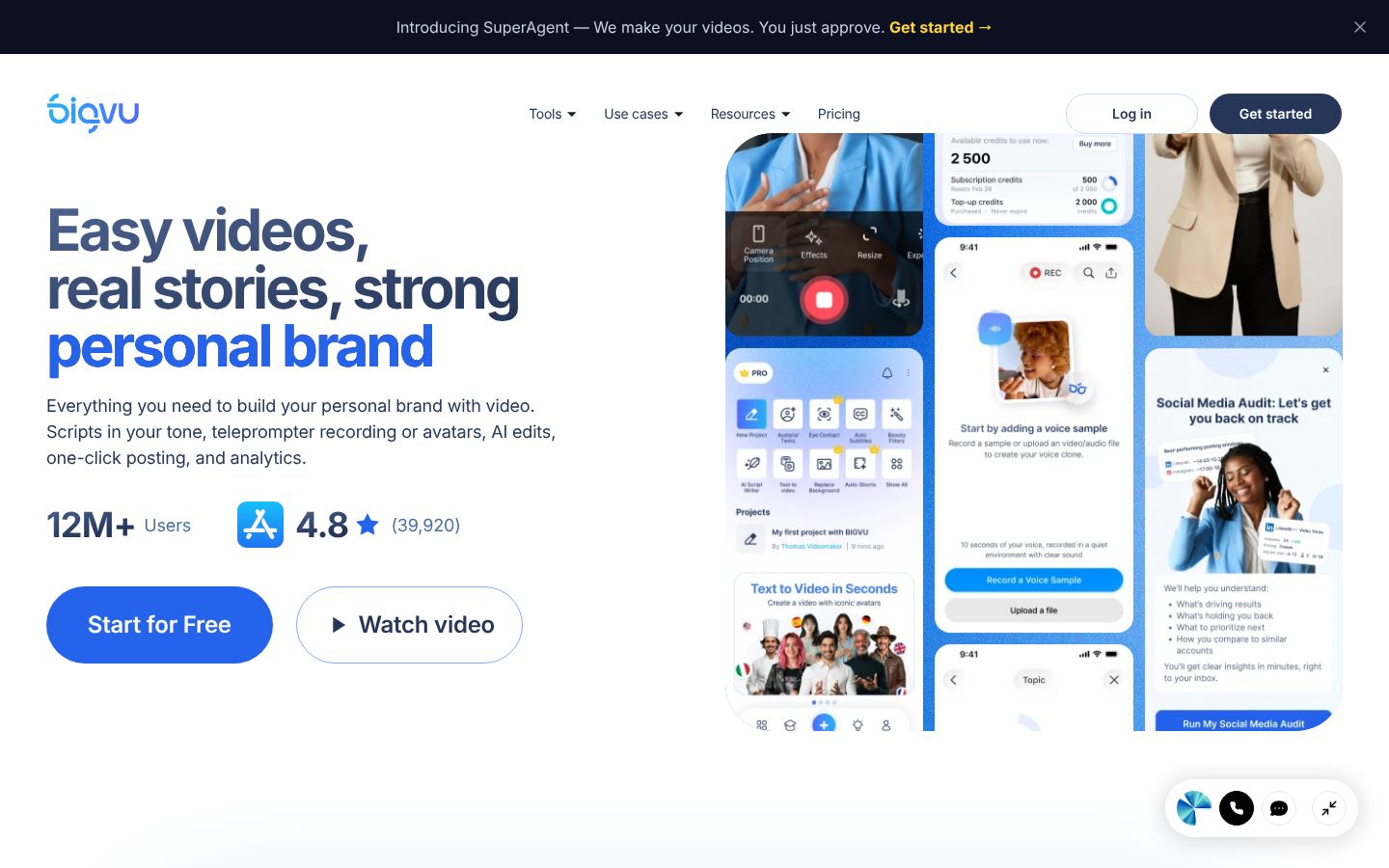
BIGVU is a video app for iPhone, iPad, Android and the web, built around a teleprompter. You write or generate a script, read it on the teleprompter while the camera records, then add automatic captions, your logo and brand colors, and post to social channels from the same app. Its Voice Control mode scrolls the script as you speak and waits when you pause. Edits are made on the automatic transcript: you trim by selecting words, with frame-by-frame controls. The pricing page lists 'Remove filler words & gaps' among its AI edits, alongside eye contact fix, background replace, auto B-rolls and dubbing. It also makes videos without filming, through AI avatars, talking photos and Fototale photo videos. It markets itself to realtors, coaches and marketers and adds lead tools such as video emails, landing pages and the VoiceMate voice agent.
Best for: Realtors, coaches, marketers and small business owners who read a script on a teleprompter and want captions, branding and social posting in one app, or AI avatars when they would rather not film.
- Teleprompter with a Voice Control mode that scrolls as you speak and waits when you pause
- Automatic captions with themes, your logo and brand colors
- Text-based editing: trim and cut by selecting words on the automatic transcript, with frame-by-frame controls and undo/redo
- 'Remove filler words & gaps' is listed among its AI edits
- AI eye contact fix so you appear to look at the camera while reading
- Apps for iPhone, iPad and Android plus a web app
What each BIGVU plan includes a month, not just its price
| App | Plan | Price | Billing | Includes |
|---|---|---|---|---|
| BIGVU | Free | $0 | forever, for one person | 500 AI credits/month, record up to 9 min per video, teleprompter and AI scripts, social channels, 720p with watermark |
| BIGVU | Starter | $12/mo | $149/year, billed annually | About $12.42 a month; Record up to 9 min per video; no watermark, 1080p HD; brand kit (1 brand); number of videos not stated. 1,500 AI credits/month, record up to 9 min per video, no watermark |
| BIGVU | AI Pro | $19/mo | $229/year, billed annually | About $19.08 a month; Record up to 59 min per video; HD and 4K export, no watermark; number of videos not stated. 3,000 AI credits/month, record up to 59 min per video, AI eye contact fix, 4K export |
| BIGVU | Max | $49/mo | $589/year, billed annually | About $49.08 a month; Record up to 59 min per video; number of videos not stated. 10,000 AI credits/month, record up to 59 min, long talking photos, VoiceMate AI agent, Claude MCP integration |
| BIGVU | Super Agent | $239/mo | $2,868/year | About $239.00 a month; Record up to 59 min per video; booked through a strategy call; number of videos not stated. Everything in Max done for you: dedicated coach |
Prices as of 2026-11-07, from each app's own pricing page.
BIGVU features, checked against ClipEasy for talking-head videos
| Feature | ClipEasy | BIGVU |
|---|---|---|
| Edit steps you still do yourself | None: all 6 done for you | Tighten the opening; you finish remove retakes and false starts |
| Fixes overlapping audio | Yes | — |
| Edits several different videos at once | Up to 10 | — |
| Teleprompter keeps up if you skip a line | Yes, it finds your line, or tap the next card | — |
| Take stops on its own | Yes, three seconds after your last line | — |
| Cut checked against your script | Yes, keeps the take where you got each line right | — |
| Batch edits run while you do something else | Yes | — |
| Cuts dead air and pauses | Yes | Yes |
| Removes filler words | Yes | Yes |
| Removes retakes and false starts | Yes | Limited |
| Auto captions | Yes | Yes |
| Audio cleanup | Yes | Yes |
| Tightens the opening | Yes | Limited |
| Edit it yourself after the AI edit | Yes, in a few taps | Yes |
| Teleprompter that follows your voice | Yes | Yes |
| Film in the app or upload a take | Yes, both | Yes, both |
| iPhone app | Coming soon | Yes |
| Android app | Coming soon | Yes |
| No scroll speed to set | Yes, the script follows your voice and waits when you pause | Yes, with Voice Control |
| Works without editing experience | Yes, ClipEasy does the cutting | Yes |
| Save to phone and post anywhere | Yes, TikTok, Reels, Shorts or anywhere else | Yes |
- Cuts dead air and pauses: Pricing lists 'Remove filler words & gaps' among AI edits; the plan it starts on is not shown
- Removes filler words: Pricing lists 'Remove filler words & gaps' among AI edits
- Removes retakes and false starts: You capture multiple takes and choose the best, and trim by selecting words on the transcript
- Auto captions: Automatic captions with themes, logo and brand colors
- Audio cleanup: A reviewer mentions an audio enhancement feature
- Tightens the opening: You set the start point yourself by tapping words on the transcript
- Edit it yourself after the AI edit: Transcript trimming, frame-by-frame controls, undo and redo
- Teleprompter that follows your voice: Voice Control scrolls while you speak and waits when you pause
- Film in the app or upload a take: Teleprompter recording in the app; a reviewer describes adding captions to videos recorded outside it
- iPhone app: App Store listing for iPhone and iPad
- Android app: Google Play listing
- No scroll speed to set: Voice Control follows your voice; the standard prompter has a scroll speed you set
- Works without editing experience: Listing says 'No editing needed'; trims and take choice are still done by hand
- Save to phone and post anywhere: Exports to the camera roll and posts to YouTube, Facebook, Instagram and Twitter
What matters for teleprompter videos
ClipEasy edits the whole take for you
For talking-head videos, ClipEasy cuts pauses and filler, removes retakes and false starts, adds captions, cleans the audio and tightens the opening. BIGVU leaves the opening to you and only partly handles retakes.
A teleprompter that guides the cut
ClipEasy's script follows your voice, keeps up if you skip a line and stops the take three seconds after your last line. Then it keeps the take where you got each line right.
Up to 10 videos edited at once
Add a raw take for each video and ClipEasy edits up to 10 of them at once while you do something else, one for each product or topic.
Coming soon to iOS and Android
ClipEasy is coming soon to both iOS and Android, with early access through the waitlist. BIGVU is out today on iPhone, iPad, Android and the web.
BIGVU's Voice Control teleprompter
BIGVU's prompter scrolls as you speak and waits when you pause. It adds a remote on a second iPhone or Apple Watch, and DualShot records vertical and horizontal in one take.
BIGVU's transcript editing
In BIGVU you trim by selecting words on the transcript, with frame-by-frame controls. You pick your take and tap a word to set the start point yourself.
BIGVU captions and posting
Automatic captions with your logo and brand colors, then one-click posting to YouTube, Facebook, Instagram and Twitter, or scheduling to connected channels.
BIGVU avatars without filming
BIGVU makes AI avatar and talking-photo videos. ClipEasy edits your real face and footage and does not generate actors.
BIGVU: pros and cons
- Voice Control teleprompter scrolls as you speak and waits when you pause
- Automatic captions with themes, your logo and brand colors
- Lists filler word and gap removal among its AI edits
- Available today on iPhone, iPad, Android and the web
- AI avatars and talking photos when you would rather not film
- Retakes are partly yours: you capture several takes, pick one and trim it on the transcript
- The opening is yours to set: you tap a word on the transcript to choose the start point
- Free exports are 720p and watermarked, and Free and Starter cap recording at 9 minutes per video
- Eye contact fix, background replace, B-rolls and 4K start at AI Pro, $229 a year, about $19.08 a month
- Reviewers report audio out of sync with lips, crashes, lost projects and teleprompter settings resetting between takes
- Reviewers report trouble cancelling, charges after free trials, slow support replies and extra upsells
What ClipEasy will do for teleprompter and talking-head videos
Product videos in a batch
Add up to 10 raw takes, one for each product, and ClipEasy edits every one of them while you do something else.
Talking-to-camera ads
Give ClipEasy a raw take with pauses and stumbles left in, and get back a cut, captioned ad with clean audio and a tighter opening.
Testimonial-style videos
Talk naturally and start over when you need to. ClipEasy removes the retakes, false starts and filler and adds captions.
Scripted videos with the teleprompter
Bring your script and read it into the lens. The teleprompter follows your voice, and ClipEasy keeps the take where you got each line right.
Unboxing and first impressions
Film your first reaction in one raw take. ClipEasy cuts the dead air and awkward moments and adds captions so it is ready to post.
Reviews filmed in one take
Record your review in one go, pauses and all. ClipEasy trims the silences and filler, cleans up the audio and tightens the opening.
What BIGVU users report
Free Trial SCAM!
“Signed up for the free trial. Half of the features aren't even available on the trial. The only thing I was able to do is add logo/captions on my video - that's it! No filters, nothing. Tried to cancel the day BEFORE trial ended, NO BUTTON on "Cancel Subscription". Wake up today with Apple charge.”
recorded video's voice is out of sync with the lip movement
“I bought it for the teleprompter app. There is a bug: the recorded video’s voice is out of sync with the lip movement. This bug is over one year old. I have made support aware of it. They are in denial despite multiple users having this issue.”
Too glitchy
“As for recording, say you make a mistake and then you want to just carrying on recording just before that mistake? There's an option to start the script where you finished but 9/10 it jumps, which renders it pointless.”
Exceptional customer support!
“Exceptional customer support! Especially in the era of new AI tools popping out every day this is how companies win! Kudos to Bruno!”
Questions people ask
How much does the BIGVU app cost?
BIGVU runs from $0 a month on Free to $239 a month ($2,868 a year) on Super Agent. Starter is $149 a year, about $12.42 a month; AI Pro is $229 a year, about $19.08 a month; Max is $589 a year, about $49.08 a month. ClipEasy's pricing is covered below, and the table above shows what each plan includes.
Can you use BIGVU for free?
Yes. BIGVU's Free plan is $0 a month with 500 AI credits, 720p watermarked exports and a 9-minute cap per video. Reviewers report being charged after free trials, so check how to cancel before you start one.
What is BIGVU used for?
Recording scripted talking-head videos on a teleprompter, then adding captions and branding and posting to social channels. It also writes scripts with AI, makes listing videos from photos and creates avatar videos without filming.
Does BIGVU have a desktop version?
It has a web app alongside its iPhone, iPad and Android apps, and they sync. ClipEasy is coming soon to iOS and Android.
Is ClipEasy or BIGVU better for teleprompter videos?
ClipEasy, once it launches, if you want the edit done for you. Both teleprompters follow your voice. ClipEasy then removes retakes and false starts and tightens the opening for you, where in BIGVU you choose the take and set the start point yourself on the transcript. BIGVU is the one you can use today.
What do BIGVU's plans include, and what will ClipEasy cost?
BIGVU Starter, about $12.42 a month, removes the watermark and adds 1080p but keeps the 9-minute cap. AI Pro, about $19.08 a month, adds 59-minute recording, eye contact fix and 4K; no BIGVU plan states a number of videos. ClipEasy will have 3 plans, between $15 and $60 a month, coming soon, with names and exact prices not decided yet.
When will ClipEasy be available on iOS and Android?
ClipEasy is coming soon to iOS and Android. Join the waitlist on clipeasy.app to get early access when it launches.
Why choose ClipEasy over BIGVU for talking-head videos?
Because ClipEasy does the edit steps BIGVU leaves to you. It removes retakes and false starts and tightens the opening, so each personal brand video comes out ready to post, and it can edit up to 10 videos at once while you do something else. BIGVU fits if you need an app today or want AI avatars.
Similar apps
ClipEasy vs BIGVU
BIGVU alternatives
CapCut: features, pricing and reviews
Opus Clip: features, pricing and reviews
Descript: features, pricing and reviews
Captions: features, pricing and reviews
Submagic: features, pricing and reviews
InShot: features, pricing and reviews
Videoleap: features, pricing and reviews
Splice: features, pricing and reviews
VN: features, pricing and reviews
Edits: features, pricing and reviews
Mimic: features, pricing and reviews
Mashcut: features, pricing and reviews
CutUGC: features, pricing and reviews
CutAI: features, pricing and reviews
PromptSmart: features, pricing and reviews
BlitzCut: features, pricing and reviews
Teleprompter.com: features, pricing and reviews
Edit up to 10 product videos at once
Add a video for each product and ClipEasy edits every one while you do something else. Join the waitlist to get it on launch day.