
Submagic: the AI caption and clip editor for short-form videos
For creators and teams making captioned short videos: what Submagic does for captions, cuts and podcast to shorts, what each plan includes, and where ClipEasy, coming soon, edits talking-to-camera takes in full.
Get early access Coming soon to iOS and Android
Edit up to 10 product videos at once
Add a video for each product and ClipEasy edits every one while you do something else. Join the waitlist to get it on launch day.
 Submagic
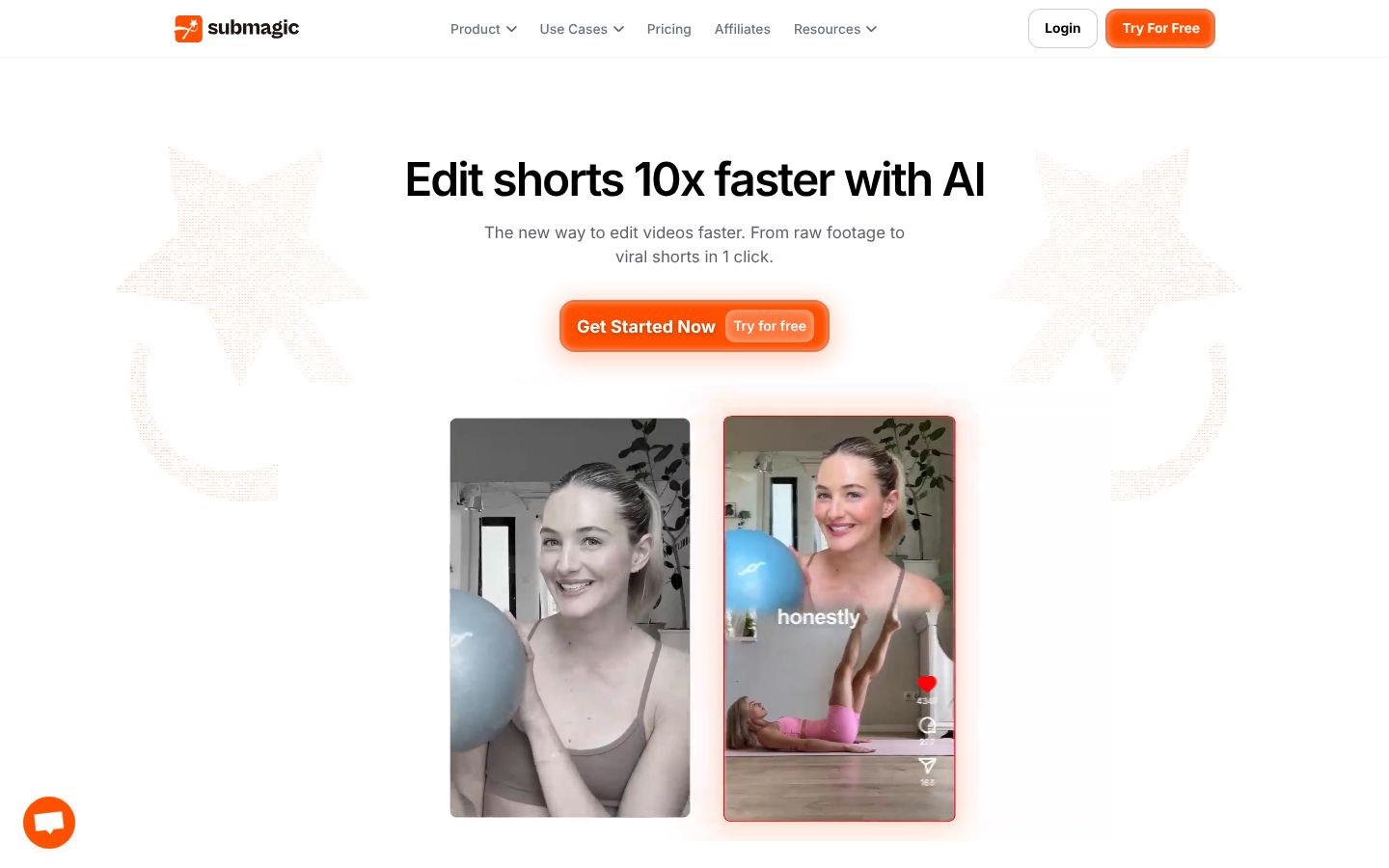
Submagic is a web-based AI video editor for short-form video. You upload a video or a YouTube link, and it adds animated captions in 123 languages, removes silences, inserts B-roll and finds key moments on its own. Higher plans add AI removal of bad takes and filler words, audio clean-up, auto zooms and eye contact correction. Magic Clips cuts one long video, such as a podcast or interview, into several shorts. You can trim by editing the text, keep brand fonts and templates, and schedule posts to TikTok, Reels, Shorts and other channels from the editor. It also offers AI avatars for videos without filming, plus an API. It markets to business owners, media companies, marketing teams, agencies, advertisers and content creators.
Best for: Creators, marketing teams and agencies who want animated captions, B-roll and auto-publishing on short videos, or who turn podcasts and long videos into many shorts.
- Animated caption styles in 123 languages, with a stated 99% accuracy
- Removes silences, bad takes and filler words and cleans audio with AI (Pro and Business plans)
- Inserts B-roll and adds auto zooms on its own
- Magic Clips turns one long video, such as a podcast, into several shorts
- Schedules and publishes to TikTok, Reels, Shorts and other channels from the editor (Pro and Business)
- Text-based trimming lets you cut the video by editing its transcript
What each Submagic plan includes a month, not just its price
| App | Plan | Price | Billing | Includes |
|---|---|---|---|---|
| Submagic | Starter | $19/member/mo | Billed monthly, cancel anytime | 15 videos a month, about $1.27 a video; 2 min per video; 1080p at 30 fps; no watermark; no AI silence, bad-take or filler-word removal or audio clean-up. 45 credits (= 15 videos), 2 min per video |
| Submagic | Starter (yearly) | $12/member/mo, billed yearly | Billed yearly; $144 per member a year | About $12.00 a month; 15 videos a month, about $0.80 a video; 2 min per video; 1080p at 30 fps; no watermark; extra AI features cost 1 to 3 credits each. |
| Submagic | Pro | $39/member/mo | Billed monthly, cancel anytime | 40 videos a month, about $0.97 a video; 5 min per video; 1080p or 2K at 30 fps; no watermark; extra AI features cost 1 to 3 credits each. 120 credits (= 40 videos), 5 min per video |
| Submagic | Pro (yearly) | $23/member/mo, billed yearly | Billed yearly; $276 per member a year | About $23.00 a month; 40 videos a month, about $0.57 a video; 5 min per video; 1080p or 2K at 30 fps; no watermark. Same as Pro: 120 credits a month (= 40 videos), 5 min per video |
| Submagic | Business | $69/member/mo | Billed monthly, cancel anytime | 100 videos a month, about $0.69 a video; 30 min per video; up to 4K at 60 fps; no watermark; extra AI features cost 1 to 3 credits each. 300 credits (= 100 videos), 30 min per video, 4K at 60 fps |
| Submagic | Business (yearly) | $41/member/mo, billed yearly | Billed yearly; $492 per member a year | About $41.00 a month; 100 videos a month, about $0.41 a video; 30 min per video; up to 4K at 60 fps; no watermark. Same as Business: 300 credits a month (= 100 videos), 30 min per video, 4K at 60 fps |
| Submagic | Custom Plan | On request | Contact sales | Custom videos a month, minutes per video, members and Magic Clips limits; unlimited custom templates; dedicated customer success; SSO |
Prices as of 2026-11-07, from each app's own pricing page.
Submagic's top features, checked against ClipEasy
| Feature | ClipEasy | Submagic |
|---|---|---|
| Fixes overlapping audio | Yes | — |
| Tightens the opening | Yes | — |
| Edits several different videos at once | Up to 10 | — |
| Teleprompter that follows your voice | Yes | — |
| iPhone app | Coming soon | — |
| Android app | Coming soon | — |
| No scroll speed to set | Yes, the script follows your voice and waits when you pause | — |
| Teleprompter keeps up if you skip a line | Yes, it finds your line, or tap the next card | — |
| Take stops on its own | Yes, three seconds after your last line | — |
| Cut checked against your script | Yes, keeps the take where you got each line right | — |
| Batch edits run while you do something else | Yes | — |
| Cuts dead air and pauses | Yes | Pro and Business only |
| Removes filler words | Yes | Pro and Business only |
| Removes retakes and false starts | Yes | Pro and Business only |
| Auto captions | Yes | Yes, 123 languages |
| Audio cleanup | Yes | Pro and Business only |
| Edit it yourself after the AI edit | Yes, in a few taps | Yes |
| Film in the app or upload a take | Yes, both | Upload a video or YouTube link |
| Works without editing experience | Yes, ClipEasy does the cutting | Yes |
| Save to phone and post anywhere | Yes, TikTok, Reels, Shorts or anywhere else | Publishes to social from the editor on Pro and up |
- Tightens the opening: It offers AI hook titles, which add a title rather than trim the opening
- Edits several different videos at once: Magic Clips cuts one video into many shorts, which is a different job
- iPhone app: The 'Submagic ai' App Store listing is from another developer
- Android app: The Google Play 'Submagic' app is an unofficial guide, not affiliated with Submagic
- Cuts dead air and pauses: AI remove silences is not included on Starter
- Removes filler words: AI filler words is listed for Pro and Business, not Starter
- Removes retakes and false starts: AI remove bad takes comes with Pro and up
- Auto captions: Captions on every plan
- Audio cleanup: AI clean audio comes with Pro and up
- Edit it yourself after the AI edit: Text-based trimming on every plan
- Works without editing experience: A homepage testimonial calls it easy even for beginners
- Save to phone and post anywhere: Saving to a phone is not stated; publishing is not on Starter
Submagic and ClipEasy for captioned short videos
The full clean-up on every take
For short-form videos filmed talking to camera, ClipEasy cuts pauses and dead air, removes filler, retakes and false starts, adds captions, cleans up the audio and tightens the opening in each edit.
Submagic Starter leaves four steps to you
Starter, at $19 a month, has no AI silence, filler-word or bad-take removal and no audio clean-up. Across ten product videos in an afternoon, you trim every pause and stumble yourself in the transcript.
Submagic's AI clean-up costs extra credits
Submagic charges 3 credits per upload and 1 to 3 credits per extra AI feature, so heavy AI use leaves fewer videos than the plan's headline count. ClipEasy runs all six edit steps in each edit.
Up to 10 different videos at once
Add one take per product and ClipEasy edits them all while you do something else. Submagic's Magic Clips cuts one long video into shorts, which is a different job.
A teleprompter that follows your voice
It waits when you pause, keeps up if you skip a line and stops the take after your last line. ClipEasy then keeps the take where you got each line right. Submagic lists no teleprompter or in-app filming.
Built for iPhone and Android
ClipEasy is being built for both phones. Submagic is web-based, and the App Store and Google Play apps using its name are from another developer or are an unofficial guide.
Where Submagic is the right tool
Submagic is available today. It also turns a podcast into shorts with Magic Clips, and it offers B-roll, AI avatars and scheduled publishing, none of which ClipEasy lists.
Coming soon, with early access
ClipEasy is not out yet. It is coming soon to iOS and Android, and the waitlist gets early access.
Submagic: pros and cons
- Animated captions in 123 languages on every plan
- Magic Clips turns one podcast or long video into several shorts
- Adds B-roll and auto zooms, and publishes to TikTok, Reels and Shorts from the editor on Pro and up
- No watermark on any paid plan, and exports up to 4K at 60 fps on Business
- Available today on the web, and reviewers praise its customer support
- Silence, filler-word and bad-take removal and audio clean-up come with Pro and Business only, not Starter
- Runs on credits: an upload costs 3 and each extra AI feature 1 to 3, so you get fewer videos than the headline count
- Caps each video at 2 minutes on Starter, 5 on Pro and 30 on Business
- Starts from an uploaded video or YouTube link, and its listed features include no teleprompter or in-app filming
- Web-based: the App Store and Google Play apps under its name are not its own
- Reviewers report billing problems, such as repeated charge attempts, and exports that come out slightly compressed
What ClipEasy will edit for you from one raw take
Product videos in a batch
Add up to 10 raw takes, one for each product, and ClipEasy edits every one of them while you do something else.
Talking-to-camera ads
Give ClipEasy a raw take with pauses and stumbles left in, and get back a cut, captioned ad with clean audio and a tighter opening.
Testimonial-style videos
Talk naturally and start over when you need to. ClipEasy removes the retakes, false starts and filler and adds captions.
Scripted videos with the teleprompter
Bring your script and read it into the lens. The teleprompter follows your voice, and ClipEasy keeps the take where you got each line right.
Unboxing and first impressions
Film your first reaction in one raw take. ClipEasy cuts the dead air and awkward moments and adds captions so it is ready to post.
Reviews filmed in one take
Record your review in one go, pauses and all. ClipEasy trims the silences and filler, cleans up the audio and tightens the opening.
Questions people ask
Is ClipEasy or Submagic better for captioned short videos?
For captioned short videos made from talking-to-camera takes, ClipEasy is the pick: every edit cuts pauses, filler, retakes and false starts, adds captions, cleans the audio and tightens the opening. For podcast to shorts, Submagic's Magic Clips does a job ClipEasy does not. Submagic is also the option if you need an app working today, since ClipEasy is coming soon.
Does Submagic remove silences and filler words on every plan?
No. Silence, filler-word and bad-take removal and audio clean-up come with Pro and Business only, so on Starter you trim them yourself by editing the transcript. On Pro and up, each extra AI feature costs 1 to 3 credits on top of the 3-credit upload.
How much do Submagic and ClipEasy cost a month?
Submagic Starter is $19 a month for 15 videos, Pro $39 a month for 40 and Business $69 a month for 100, per member. Billed yearly they come to $12, $23 and $41 a month. ClipEasy will have 3 plans between $15 and $60 a month, coming soon, with plan names and exact prices not decided yet.
Does Submagic have an iPhone or Android app?
Not an official one: Submagic is web-based. The 'Submagic ai' App Store listing is from another developer, and the Google Play 'Submagic' app is an unofficial guide not affiliated with Submagic. ClipEasy is being built for iOS and Android.
Can I film with a teleprompter in Submagic or ClipEasy?
In ClipEasy, yes. Its teleprompter follows your voice, waits when you pause and stops the take after your last line, and you can also upload a take you already have. Submagic starts from an upload or YouTube link, and its listed features include no teleprompter.
When will ClipEasy be available?
ClipEasy is coming soon to iOS and Android. Join the waitlist on clipeasy.app to get early access.
Why choose ClipEasy over Submagic for talking-to-camera brand videos?
ClipEasy is built for this job. It will edit up to 10 product videos at once and do the full clean-up in each one. You will film with a teleprompter that follows your voice on iPhone or Android, then change anything yourself in a few taps. It is coming soon.
Similar apps
ClipEasy vs Submagic
Submagic alternatives
CapCut: features, pricing and reviews
Opus Clip: features, pricing and reviews
Descript: features, pricing and reviews
Captions: features, pricing and reviews
BIGVU: features, pricing and reviews
InShot: features, pricing and reviews
Videoleap: features, pricing and reviews
Splice: features, pricing and reviews
VN: features, pricing and reviews
Edits: features, pricing and reviews
Mimic: features, pricing and reviews
Mashcut: features, pricing and reviews
CutUGC: features, pricing and reviews
CutAI: features, pricing and reviews
PromptSmart: features, pricing and reviews
BlitzCut: features, pricing and reviews
Teleprompter.com: features, pricing and reviews
Record it once. Post it in minutes.
Leave the stumbles in. ClipEasy cuts them out and adds captions, and you change anything in a few taps. Coming soon to iOS and Android.