
 ClipEasy team · 2026-11-08 · 22 min read
If you searched what is a UGC creator after seeing the title in a bio or a job post next to 'no followers needed', the short answer is that one title gets stretched over three different jobs. The follower line holds cleanly for only one of them: filming to a brand's brief and handing over the files. That is also the job the definitions describe.
Note: How we researched this: we read 25 paid listings that call the role 'UGC creator' or similar, posted January 2025 to November 2026 on freelance boards, job boards, casting sites and marketplace brief pages, and checked every one for the same 14 things. We ran the same kind of check on the 14 most-viewed YouTube videos in that window where a creator puts a UGC income figure up front, and on 11 public pages that recruit UGC creators. Most of it is US and English-language, so trust the shape more than any exact figure. Marketplace fees come from each marketplace's own help pages.
What is a UGC creator?
UGC stands for user-generated content. On its own, the term means the unpaid post a real customer makes about something they bought, on their own profile, in their own words. Nobody briefed them, nobody paid them, and nobody can ask them for a retake.
A UGC creator does the paid version. A brand pays you to make the kind of video a customer would make, usually you talking to camera about a product, to its brief, and buys the files. The brand then runs the video as an ad, puts it on a product page or posts it on its own accounts. In the 25 paid listings we read, 20 asked for briefed or scripted ad files, and 14 said outright that the videos were for the brand's paid ads.
Think of it as being cast in a small phone-shot commercial, and practise accordingly: talking naturally to a lens and following a brief matter far more than building a feed.
Do you need followers to be a UGC creator?
For file work, no. An influencer sells access to an audience. A UGC creator sells a video, and the brand's ad budget supplies the reach, which is why none of the 20 ad-file listings we read set a follower minimum: 14 never mentioned followers, 4 said none was needed, and 2 asked only for a portfolio. The video usually never runs on the creator's own pages at all, a point Gianna Cestone, who has done UGC for over six years, makes in a breakdown of why followers don't matter.
Brands pay people with no audience because it is cheaper than a shoot. An agency's cost comparison puts one professional brand shoot at $2,000 to $10,000, enough to test 8 to 12 creator-made ad concepts instead. Brands buy many cheap videos to find the few that work, so they need a steady supply of creators who can deliver.
One large cash-per-video marketplace, the one listed as B in the comparison table near the end of this page, puts "No following required" on its creator page and screens applicants with an intro video. Posting on your own account exists there too, priced as an optional add-on. Paying separately for the file and for the audience is the clearest sign they are two different products.
What brands screen on instead
The strongest filter in our sample was casting. Age, ethnicity, gender or life stage was the main screen in 16 of 25 listings: 'Female. 50+', 'aged 45+', 'Gen-Z woman', 'Busy Mom Family Vlogger'. None of the 25 asked you to have used the product before, and none made you buy it.
You get picked or passed over for being who you are, the way an actor does, so the listings worth your evening are the ones that describe someone like you. If you don't match the briefs you see most often, look for categories where your life stage is the customer. Several listings we read wanted creators over 45. Not fitting the common briefs is a reason to aim narrower, and no reason to quit.
The two 'UGC' jobs that run on your own account
We expected the jobs tied to your own account to pay the most. They paid the least. The 4 listings that required posting on the creator's account had a median of $54.64 per video against $200 for file work. One hiring post on r/ugc asks you to create a new profile for the campaign and post daily for $600 a month. Divide it: 30 videos, $20 each, plus view bonuses.
The income videos call this 'Canvas UGC' or high-volume tech UGC: you open brand-new TikTok or Instagram accounts for an app and get a small base per video plus per-view money. One creator described posting up to 50 times a day. It doesn't need followers either, because the new account is the distribution.
We'd call it a different job wearing the same label, and we wouldn't take it as a first gig. A small base per video for daily output trains you for volume and teaches you nothing about working to a brief.
Commission and ambassador programs are where follower counts finally show up. In the 11 recruitment pages we read, the 4 commission programs asked for a median of 1,000 followers and always required posting on your account. They guaranteed nothing per video: what you earn is a commission on the sales you drive, around 10% where a rate was stated. Knix's ambassador program is typical, asking for that same follower count on Instagram, and its page says it does not include guaranteed compensation.
Even there the gates were small: none of the four asked for more than that median. One commission program set no minimum at all, and one small brand applied its 800-follower affiliate minimum to a UGC track that paid only in product and involved no posting.
Job | Who posts | What the brand pays for | Follower ask we saw | Pay we saw |
|---|---|---|---|---|
File work | The brand | The video files | None in 20 listings | Median $200 per deliverable |
Posting work (incl. 'Canvas UGC') | You, often on a new account | Your posts and their views | None set, but you need an account | Median $54.64 per video (only 4 listings) |
Commission or ambassador | You, on your own account | Sales you drive | Median 1,000 (4 pages) | $0 guaranteed; about 10% commission |
Influencer deal, for comparison | You | Access to your audience | Your audience is the product | Not measured here |
Three jobs under one title, from the 25 paid listings and 11 recruitment pages we read. The posting and commission rows rest on 4 examples each.
To sort a listing you're looking at right now, check three things:
Find where the video will be used. The brand's ads, website or channels means file work.
Check who posts. If it's you, it's posting work or commission work.
Look for guaranteed cash per video. Commission only or product only means you're working for sales or for free.
What a UGC job actually involves, from brief to delivered files
A small edited package took one creator about 6 to 8 hours, and the biggest single block was editing. Lucille Marson filmed the whole Haruharu Wonder skincare job, two video ads and two photos, from the package arriving to the invoice being paid. It is one creator's account of one job, but it is the most complete picture of the hours we found.
Brief and script, 1 to 2 hours. She reads the brief, writes a script and a shot list, and gets the brand to approve both before filming.
Filming, about 2 hours. Talking to camera on a phone with a ring light, then close-up B-roll of the product.
Editing, about 3 hours. Cutting dead air, syncing voiceover, adding on-screen text and a 50% opacity watermark.
Draft by cloud link. The watermarked files go to the brand for review.
Invoice, then clean files. Unwatermarked videos go out only after payment lands.
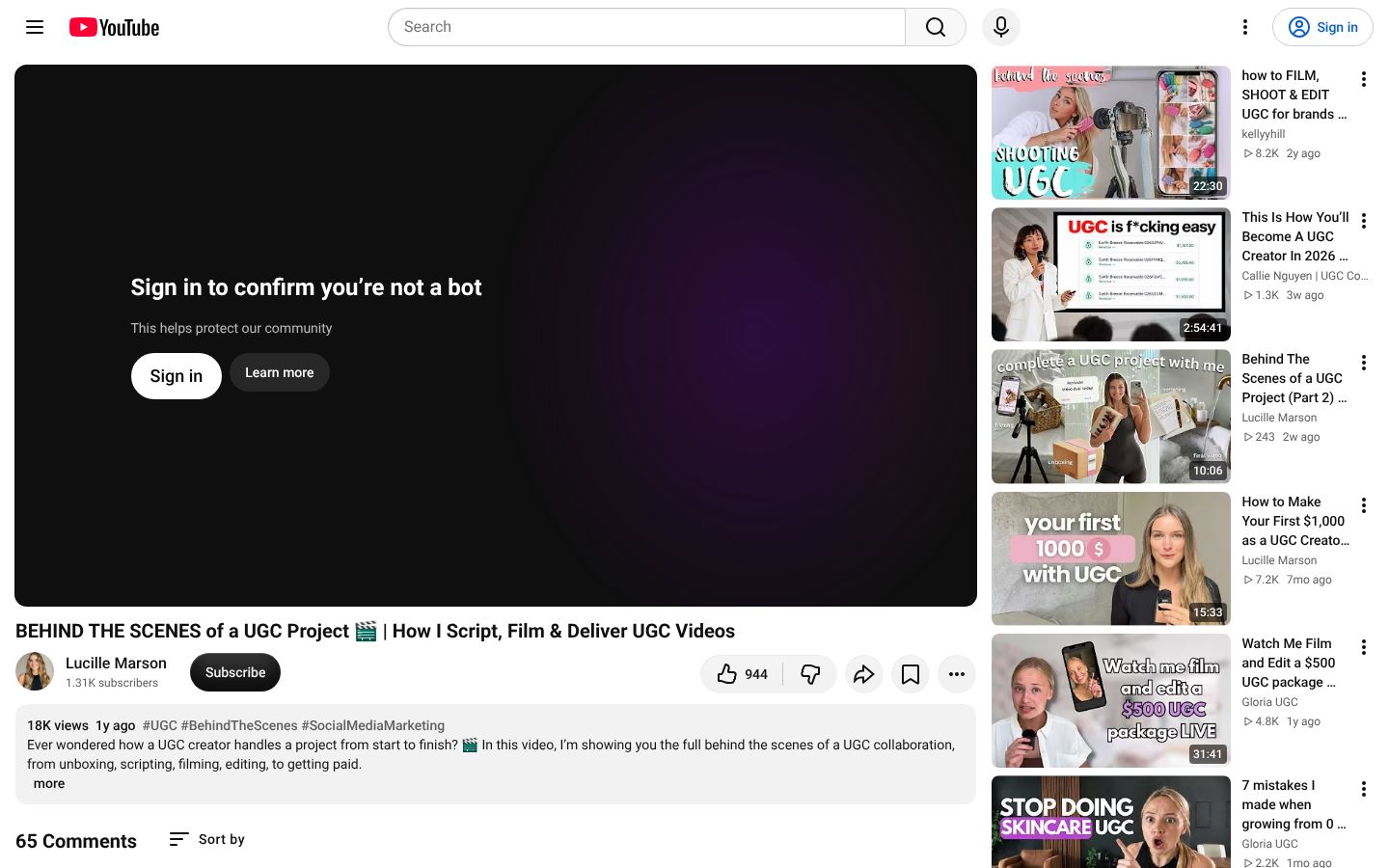
Two habits in that list are worth copying from day one. Getting the script approved before you film means a brand can't ask for a reshoot because it changed its mind. The watermark means a draft can't be used before you're paid.
Those three editing hours are the tedious part, mostly hunting for pauses and fluffed lines in raw talking takes. We make ClipEasy, an editor coming soon to iOS and Android, for exactly that step, and the editing section further down covers what it does and what to use in the meantime.
The raw-footage job: you don't edit at all
Agencies often want raw footage instead, because their own editors cut many ad versions from it. Nate Flake's $600 Renewal by Andersen job was two script reads at $300 each, delivered unedited to a cloud folder. He says each take's label out loud ('Video 1, Hook 1'), changes shirts between reads so one setup gives several looks, turns off the air conditioning to kill the hum, and shoots close-up B-roll on the rear camera.
An agency brief template Dara Denney shared shows what these briefs ask for: vertical 9:16 files, a 10-day turnaround, one to three seconds of silence before and after you speak so editors have room to cut, and no beauty filters, music or captions on the raw clips. Add any of those and the footage is harder for the agency to use.
Who writes the words varies a lot. Of the 20 ad-file listings we read, 5 supplied a full script, 4 supplied hooks or talking points, 6 had the creator write to a loose brief and 5 didn't say. For a first paid job, pick the full script or the raw-footage brief over 'concept, script, film and edit'. The brand has already decided what it wants said, so all you have to get right is delivery, and you see what a good script looks like before you have to write one.
The five formats brands order
Most briefs order one of five formats, and each needs something specific on camera. Agency brief-writers Nick Theriot and Abi Friedmann break them down in a video on briefing UGC creators:
Format | What it needs on camera |
|---|---|
Unboxing | Clean hands, a clear surface, close framing on the packaging, and the sound of it opening |
Demo or tutorial | Step-by-step use in sync with what you say, other brands' logos turned away |
Voiceover over B-roll | 10 to 15 cutaways from different angles, voice recorded separately |
Problem and solution | Visible frustration in the first seconds, then the product fixing it, then a call to action |
Testimonial to camera | Eye contact with the lens, a conversational tone, pauses at the start and end of takes |
Five UGC formats and what each needs on camera, as agency brief-writers break them down.
'UGC on TikTok' usually means your face in a brand's ad, posted by the brand. Wherever the files end up, they are vertical videos the brand runs as TikTok, Instagram or Facebook ads, so on file work you don't post anything yourself.
How much do UGC creators get paid?
UGC is priced per video. The 20 ad-file jobs we read paid a median of $200 per deliverable, with real per-video rates running from $6 clips to a $450 package. Treat that median as rough: 9 of our 25 listings were flat fees that didn't say how many videos they covered.
Source | What it measures | Figure |
|---|---|---|
Our 25 listings (20 ad-file jobs) | Pay per video or deliverable | Median $200; $6 clips up to a $450 package |
Collabstr 2026 report | Average UGC rate on its own platform | $180 asking, $154 paid out; nearly 80% of all its collaborations under $300 |
Anna (@APlusSocials), one creator's card | Base price by experience, organic use only | $100–$200 beginner, $250–$400 intermediate, $500+ advanced |
Same card | Add-ons | $50 per extra hook; raw files +50–100%; paid ads 20–30% of base per month; permanent use 2–3x base |
What UGC videos pay, by source. Divide any flat fee by its video count first.
Collabstr's 2026 report is one marketplace's figures for its own deals, and Anna's tiers are one working creator's pricing. They come at the question from different places and still put a single video in the low hundreds. That is why we'd pitch a first quote somewhere between the bottom of Anna's beginner tier and a little above our median.
What that works out to per hour
This is a rough estimate, not a measured rate. Two videos at our median comes to $400, and spread over the 6 to 8 hours of Lucille Marson's job, that is roughly $50 to $65 an hour. Her actual fee isn't stated, her package also included two photos, and the figure is before marketplace fees and the unpaid hours spent finding the job.
Divide the flat fee before you get excited
A storage brand's listing offered $120 for 20 short silent clips. It reads like a fee, and it works out to $6 a video. Do this division on every listing before you compare it with anything, the same sum that shrank the daily-posting offer earlier.
What raises a quote, and what a flat fee may hide
Every add-on on the creator card in the table raises the quote: another hook, the unedited footage, running the video as a paid ad, rights with no end date. The one a flat fee most often hides is usage rights, meaning what the brand may do with your video, where it runs and for how long.
Listings rarely price usage separately. In 11 of our 20 ad-file listings, paid-ad use was included in the base fee, and the other 9 didn't say. In a debate among brand owners and creators, a creator partnerships manager describes agencies treating 30 to 90 days of ad use as part of the base price.
Before you accept a flat fee, ask what it includes:
Where it runs: the brand's own posts, or paid ads.
For how long: 30 days, 90 days, or forever.
Whether your handle is used: whitelisting means ads running under your name.
Whether they also want raw files, which some creators charge for.
Whitelisting needs no audience of your own, because the brand's ad spend buys the reach. That makes it a separate decision from your follower count, and one agency consultancy tells creators to always charge extra for it. Some listings price it the other way: the Filterbuy listing we read folded two years of whitelisting into a $450 flat fee and asked for no follower count. If a brand wants your handle on its ads, ask which of those two deals you're being offered before you quote.
For a first job, we would accept 30 to 90 days of paid use inside the fee and push back on permanent use or whitelisting with no extra line. Those are the terms that let one video sell for a brand for years while you were paid once.
Are the UGC income claims real?
Mostly real, and almost never typical. Of the 14 most-viewed YouTube videos where a creator puts a UGC income figure in the title or first minute, 10 got the money mainly from brands paying for files, the job on this page.
What they rarely show is an ordinary month. Only 1 of the 14 headlines was a typical month. Eleven were gross totals for some period and two were best months.
The sample leans toward big numbers before anyone watches. Videos that reveal a small figure late, like $330 in 30 days or $27.80 in a first week, never put it in the title, so our rule of a figure up front screened them out. Run four checks on any headline:
Check | What to look for | What we found in 14 videos |
|---|---|---|
1. What period? | A week, a peak month, a year's total | 9 one month, 1 a single week, 1 several months, 1 a year, 2 unclear |
2. Gross or what landed? | Revenue, contracted value, or cash after fees | 11 gross for a period, 2 best months, 1 typical month |
3. Where did the money come from? | Brand-paid files, or posting on accounts the creator runs | 10 file work, 3 posting, 1 mixed |
4. Does the video sell something? | A course, coaching or a template pack | 6 of 14 did, including all 3 posting-income videos |
Four questions to ask before a UGC income headline sets your expectations.
$20K in 7 Days fails all four checks: one week of per-view posting on new accounts, with coaching for sale underneath. $14K/Month with no following sits at the other end. It is the only headline we saw that states a typical month, from file work and retainers, and it puts the 'didn't blow up overnight' caveat early. $854.86 in September leads with what landed after platform fees from a $1,000 gross, and that is the number your rent cares about.
What makes a number believable to us: a stated period, a net figure or a clear 'this is revenue', money from brand files, and nothing for sale under the video. The creators who put caveats up front were mostly the ones with no product to sell. A headline that passes all four checks is still one person's month, so it describes what is possible and tells you little about your own first months.
Plan for uneven months and late money
Working creators in a thread about dry spells describe a holiday-season peak, then frozen budgets in the new year, and agency invoices paid 45 to 75 days after approval. A strong November and a thin January can both happen to the same creator. Treat this as freelance work with lumpy cash flow, and don't plan your rent around a headline.
How to become a UGC creator with no experience: what to do this week
You can get from nothing to a first application with what you own. The whole route, in order:
Pick one category you already buy in, plus one next to it.
Film three sample videos, up to five, with products you own.
Edit them on your phone in a free editor (the next section covers how).
Put them on a free one-page portfolio.
Apply to one no-follower marketplace (the last section compares them).
Pick a category brands are actually advertising in
Choose one category you already buy in and one next to it, such as skincare with wellness or home organisation with cleaning gadgets, the pairing Flare founder Ronny Bruknapp recommends. Pick from what you bought in the last few months, so you can talk about it without a script. Where you have a choice, favour the category where you look like the customer, because that is where the casting briefs will describe you.
Then search the free Meta Ad Library for that category and check that 15 to 20 direct-to-consumer brands are running video ads there. If they aren't, nobody is buying in that category.
Film three to five samples, not twelve
Make each sample a different format from the table earlier: a problem-and-solution video, an unboxing and a talking testimonial cover most briefs. Write a 20 to 30 second script for each as if a brand had sent it. That practises the job and gives you clean takes.
In one hiring round Bruknapp describes, a brand had 240 applications for six spots and reviewers spent about 11 seconds per applicant. They looked for category fit, natural delivery and clean audio, and passed on generalists with a dozen random products. One round is not a rule, but the logic holds: a reviewer with seconds to spare needs to see your category immediately, so three focused samples beat twelve scattered ones.
Film with what you already own
Shoot 1080p vertical, not 4K, which only costs you storage and battery.
Face a window for soft daylight.
Wipe the lens before every session.
Prop the phone at eye level on a shelf or a stack of books.
Record somewhere quiet, with the fan and air conditioning off.
So don't buy a camera for your samples. The same founder's equipment guide argues against one, and we agree: footage that looks like a TV commercial is the opposite of what brands buy these ads for, and a phone take that looks like a person talking to a friend is the look you're selling.
Once a first job pays, buy a tripod and a wired clip-on mic, together about $35 to $50 at the same guide's prices. If you can only buy one, buy the mic. In Bruknapp's account, muffled audio is the most common reason a sample gets rejected, and a viewer forgives soft focus long before they forgive an echo.
Put them on a free page
Canva's free website plan publishes a site on a free my.canva.site address, which is all you need to apply. A custom .com address needs Canva's paid plan, and no marketplace asks for one. Lay the page out in this order: your name and contact details first, then the videos grouped by niche, then a short list of what you offer (edited videos, raw footage, extra hooks).
How to edit UGC videos on your phone without losing an evening
Cutting a 30 to 60 second talking take by hand runs 60 to 150 minutes for a beginner and 30 to 45 minutes even with experience, going by what working creators report in a thread on editing time. Most of it is scrubbing the waveform for pauses and picking between repeated takes. Budget an evening or two for three to five samples, and expect paid work to take as long: Lucille Marson's three-hour block shows it doesn't shrink.
Most people start in a free phone timeline editor, and that works. In the most popular one, auto-captions and one-tap silence removal sit behind the paid plan. Silence removal also only cuts dead air. It can't tell that you said the opening line three times and the third was the good one, so you still scrub for false starts and retakes by hand. A take editor exists to cut those too.
Our pick: ClipEasy, once it launches
We make ClipEasy, and we're building it for the part silence removal misses: it is meant to cut false starts and repeated lines as well as pauses, using your script to keep the take where you got each line right, and to edit up to 10 different takes at once. It isn't out yet (coming soon on iOS and Android, with early access through the waitlist at clipeasy.app), so for this week's samples, cut them in the free editor.
At launch, what it is designed to hand back is a captioned take with the pauses, filler and retakes already out, the sound blended across each cut so the jumps aren't heard, and the opening tightened. You would still watch every cut before a sample goes on your portfolio page, because one clipped word reads as careless to a brand. Anything you disagree with, you change yourself in a few taps.
It is coming soon to iOS and Android, with three plans between $15 and $60 a month. The take editors available today are iPhone-only. ClipEasy is not out yet, so the only action is to join the ClipEasy waitlist with 'Get early access'. It won't help on raw-footage jobs, where you deliver unedited takes, and B-roll montages or keyframed effects still belong in a timeline editor.
To edit this week: on an iPhone, one of the iPhone-only take editors already in the App Store will cut retakes for a monthly subscription. On any phone, a free timeline editor does the job by hand. Edit your first sample manually either way, because cutting one take yourself teaches you what a clean cut sounds like, and that is how you'll know whether an automatic edit got it right.
Pricing your first jobs and landing them
Price the making and the ad use as separate lines. Giselle, a full-time creator who blogs as ItsSocialGi, does that on her beginner card:
$100 to $150 for a 15 to 30 second video, organic use, one revision.
$25 to $50 per extra hook.
30 to 50% extra for 30 to 90 days of paid ads.
30 to 50% extra for raw files.
50% upfront before you film.
Anna's card from the pay table is built the same way. Her base price only covers the brand posting the video on its own accounts, and every extra the brand asks for is its own line.
Both cards pull against what we read: 11 of 20 ad-file listings already put paid-ad use inside the base fee. Treat the separate line as your opening position, expect agency briefs to want short ad use included, and give on that while holding firm on permanent use and whitelisting, as in the pay section. A card is useful mostly because it lets you answer 'what's your rate?' in one message instead of guessing.
Where beginners get paid first
Start on a marketplace, not with cold pitches. Creator Sunny Drake argues that beginners who pitch brands first get burned because they don't yet know how briefs, revisions and deliverables work. A marketplace teaches you that while it pays you.
Marketplace | Followers needed | Creator fee | Base pay | What you keep per video | Regions |
|---|---|---|---|---|---|
None; free in-app certification | 20% | $60 default, $50 floor | $40 to $48 | US, UK, Germany, Australia, Canada | |
None | No platform fee | $30 per approved 15-second video; $70 at its premium tier | $30 | US, UK, Canada | |
Collabstr | None stated; accounts are audited | 15% per sale | You set your rate | 85% of your rate | 35+ countries |
1,000+ followers, 1% engagement, 500+ views | Not stated | Not stated | Not stated | Not stated |
Where beginners can start, and what you keep after fees, as each site's own pages listed them in November 2026.
If you live in one of A's five countries, we'd apply there first: after its 20% cut you keep $40 to $48 a video, against $30 on B, and getting in takes a free in-app certification. B suits you if you're in the US, UK or Canada and would rather have no cut taken on short 15-second clips, with $70 at its premium tier to work toward. Outside those countries, Collabstr is the one that lists more than 35, though there you set your own rate and it audits your accounts.
B's premium tier needs 14 approved videos, a 4.8 rating and 90% on-time delivery, so on that marketplace reliability is literally what raises your pay. Insense, with the follower minimum shown in the table, is the one on this list that isn't for zero-follower beginners.
Melanie Renee started with $5 jobs on a beginner marketplace so her portfolio carried real brand logos. Once it did, she quoted brands directly at a much higher price. Run her six-month headline through the same income checks as any other earnings video. The order she worked in is the useful part: take small paid work first, then raise the quote.
Expect a slow start
On a beginner marketplace, brands tend to pick creators who already have reviews. One newcomer there sent 290 applications in 4 days and landed nothing. Nobody can tell you how long your first yes will take, and we won't guess. Early silence usually means you are in a queue, so don't treat it as a verdict on your work. Apply where the casting fits you, and skip the rest.
The one rule that spots a scheme
Money flows from the brand to you. Jack Vitick, who works on creator campaigns at Socialync, puts it plainly: a real brand never charges a creator to be considered. Anyone asking for an onboarding fee, a paid course to see jobs, or a product bought from their 'approved vendor' is taking from you.
Courses ask for the same trade on gentler terms: you pay up front for the promise of work later. One creator shared her six months after a $5K course. She sent 600 pitches and was paid $750 for a single video.
Who this suits
This work suits people who can talk naturally to a phone, take a brand's notes without sulking and hit a delivery date every time, because reliability is what gets you a second brief. It doesn't suit anyone after passive income: every dollar here is a video filmed, edited and approved.
If that reads like you, the test costs an evening or two and nothing else: one category, three samples on the phone you own, a free page, one application. Whether you go further depends on what comes back, not on any headline.